Quote of the week

“ No steam or gas ever drives anything until it is confined.
No Niagara is ever turned into light and power until it is tunnelled.
No life ever grows until it is focused, dedicated, disciplined. ”
— Harry Emerson Fosdick ( Living Under Tension )

Everything Simplified

Tips to Master Reading Comprehension & Précis Writing

Leave a Comment

In : , , , ,

Reading Comprehension & Precis Writing
Image Source: StockSnap

Reading Comprehension

Reading Comprehension is one of the most important questions (in Pakistani Educational System) if one is taking a linguistics exam in which one has to read a passage and answer the questions asked relevant to that passage. Comprehension means to extract the hidden information. We have been doing this all our lives; read a lesson and answer the question asked at the end of the lesson.
I'll cover some important step one must follow to master reading comprehension and, of course, excel in the examination.

Step 1:-

Skim through the passage multiple times in order to get a gist of it and get to know its main idea. This step is often called earmarking. Earmarking is done to find the thesis sentence of the paragraph. Skimming makes you aware of which information is where in the paragraph. Make sure you underline important phrases / words.

Step 2:-

After you've read the piece of text and marked some important information, you are now able to answer the questions. Read the questions carefully and recall the main idea which you had got from Step 1 The question asked can be of following four types:
  1. Specific Point Questions
  2. Main Idea
  3. Inference or  Indirect Questions
  4. Words' Meanings
Specific point questions are those which you can answer by just copying some part of the passage. The main idea of the passage can also be asked which is not a big deal if you've done Step 1 with a lot of care. Inference questions are the most important ones. Inference questions are those which you have to answer by understanding the indirect meaning of the text (which comprehension really is all about) and answer in your own words.

Step 3:-

Now, you know the passage well and have read the questions, you can now search for the answers from the passage. This step is called scanning. In scanning, the information gathered in Step 1 enables you to answer the questions.
I've discussed Step 1 in other 2 steps also, this makes it clear how important is to read and understand the paragraph before moving on.
Quick Tip:
      After enough practice, you can perform Step 2 in the beginning and then perform Step 1 and Step 3 together. This would save a lot of time.

Précis Writing

Précis writing, like comprehension, is very important when it comes to showing one's writing skills. Précis means to write the main idea of something in one's own words by concizing the original text. Précis writing has no steps to follow, instead it has some tips one should always remember while writing a précis:
  • Read the passage carefully and count the number of words or make a wild guess
  • The précis should not be more than one-third of the original text
  • Facts, figures, and dates are supporting the main text, so they can be omitted
  • Repeating ideas must be excluded
  • Always write the writer's point of view 
  • Never try to merge your own ideas into the original theme
  • Try to use one-word substitutions as much as possible
  • Adverbs should be used instead of long explanations
Quick Tip:
      Beginners can divide the original text into as many parts as they like and then precise each part one by one. Summing these parts` précis will get the job done!

Read More

How to: Get Fluency in English

Leave a Comment

In : , , ,

English is Fun
We know that English is the most important language and no one can deny this fact. The English language is progressing day by day and has become an international language and is the language of science and technology. In this state of life, English is getting a more and more importance in our daily life. So friends it is important now to learn English for everyone, and I want you to speak English!
Now I will teach you three basic steps to learn English at home, just practice and start talking in English. Just follow these step and talk, talk and talk in English. Following are the three steps:

Reading

Reading is the first step in learning English. Reading is really helpful in improving your vocabulary and helps you in identifying different words. Do not just read but also keep those words in your mind. You're are not bound to any course book or any other specific books, you can read any English book or any other book that is written in English you can choose a book of your own choice. You can read English novels, magazines, newspapers etc. Keep on reading books of different kinds it will not even improve your English but also improve your knowledge.

Speaking

Speaking is the most important step in learning English. People mostly feel shy in speaking English as they have a psychological problem that they afraid of talking in English as they think that they do not know English. Friends do not feel shy in talking English, this will develop your confidence, and will help you in communication with people. You would talk fluently and you would be able to attend any type of meeting. Try to speak English with everyone either he/she is younger or older than you. Just speak now and then whenever you got a chance.
A poll was conduction on Google + asking people to mention the reason for their poor English. The poll result clearly shows how important it is to practice English by speaking as much as possible.
Google Poll

Listening

Listening is the final step of learning English. So listen to songs, watch movies and news and dramas. This will not just help you in understanding people of different parts of the world but also improve your accent. The accent is the major part of the way you talk and people will really like you and will appreciate you.

Read More

How to: Disable Cortana and Web Results in Windows 10

Leave a Comment

In : , , , ,

Image source: Xbox
Microsoft released Windows 10 on July 29, 2015, with tons of new features and improvements including a Siri-like personal assistant, Cortana. Cortana accepts voice commands for doing a specific task or searches the web(on Bing). Searches of typed words are conducted by Cortana offline and on the web as well. Many people(+ me) are annoyed by the web search results when they try to search a file on their local machine. If you are among those people, Rahib Ali from DIY Tech has a solution for your problem. Watch the video and see how:


Read More

Protect Your Private Photos in Android

Leave a Comment

In : , , , ,

Most of us love to keep images in phone as golden memories. This treasure can be spoiled by a naughty friend who would borrow your phone to see a pic and then start swiping left and right to see all of your photos. I got something that can be very useful to deal with such people.These two apps can do this job for you:-

1. Focus - Photo Sharing

Focus - Photo Sharing
This simple and light but useful gives you complete control over your photo viewers. You can limit the photos one can see on your phone when you lend your phone to your friend or someone else.
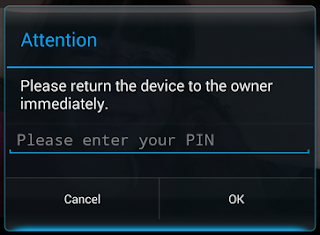
All you have to do is to set a pin code by opening Focus Settings, check all the alarms. To show someone a photo, you have to long tap the photo and tap share and select Focus from the list (multiple photos can also be selected). One can only see the pics you have selected. If your friend hits the back button, this will popup:-
Focus Popup
In case he/she hits the home button, a loud alarm will starting ringing notifying you that something is wrong. Awesome, isn't it?

2. Ninja Snap

Ninja Snap
Ninja Snap is another photo saving app that takes the picture of the person who swipes right & left from the selected pics just the way Focus shows selected images. You have to select some photos and share them with Ninja Snap and give your phone to whom you want to show photos. As soon as that person swipes towards other pics, this app would take pictures of him/her and those would be saved in your phone's gallery. Thus you can easily identify the culprit.

Read More

Get iOS & Lollipop-like Status Bar in Any Android Version

1 comment

In : , , , ,

Technology is getting advanced every new day. More and more new softwares and apps are being developed having better features than the former ones. Google's Android Lollipop and Apple's iOS are very famous for awesome UI design. One of many features is the changing of status bar color according to the app whose UI is opened.

Status Bar
Older (than Lollipop 5.0) Android versions do not support this feature but luckily, there's a method through which you can get this in older version as well (like I in my phone which runs Jellybean). You just need to follow these simple steps:-
  1. Your phone must be rooted.
  2. Firstly, you need to install Xposed Installer
    (Note: Read the description then decide to install as it can damage your phone if you install the wrong version)
  3. Allow SU Permission to Xposed Installer then open it and go to Download and then search for Tinted Status Bar.
    Tinted Status Bar
  4. After installing this module, go to Modules and check the Tinted Status Bar. Finally, soft boot your device by going to Framework in Xposed.
  5. Congrats, you've done it! The final result will be like this:
You can select the apps for which you want this module to change color. Otherwise, you can simply turn this off in a particular app by tapping its Tinted Status Bar icon in your apps list.

Read More

10+ Tips to Get Makeup Free Good Look

Leave a Comment

In : ,

Everyone of has a desire of looking like a magazine poster hero or heroine. A lot find it difficult because it can hurt monetarily. With these tricks, you can get a fancy look with very low expenses. Get a healthy, fair and fresh look and  be the hero/heroine you've ever dreamt of......

Tips to get Makeup Free Good Look
Image Source: Unsplash
Here's how:-
  • Healthy diet with more fruits
  • Plenty of water
  • A good night's sleep
  • Drink hot water with lemon in the morning
  • Give skin a boost: Ginseng, Mint & Rosemary in a topical cream
  • Groom your brows to frame your face
  • Exfoliate
  • Gentle cleanser mild toner moisturizer with SPF
  • Accessorize your outfit & hair
  • Curl your lashes
  • Apply lip balm
  • Don't pick or touch your skin

Read More

How to: download videos from facebook without any software

Leave a Comment

In : , , ,

Downloading media has always been a problem for those who like to have all the fun free. Some use Internet Download Manager but it creates some problems when you have to buy it after 30 days and some hacks don't go your way, either. Everyone likes to watch videos on Facebook and some download to watch later. World's top social network is on its way to become the second most popular network for sharing videos after YouTube.
In this tutorial, I'll show you how you can download Facebook videos without any software or third-party website simply by following these steps:

  1. Open facebook.com and login to your profile.
  2. Play the video of your choice by clicking on it.
    Playing Video
  3. When the video is playing, go to the URL(address) of the video and replace www with m. For example, if my video address is "https://www.facebook.com/raja.hasnain.570/videos/vb.100004950877781/380632628778430/?type=3&theater" I'll have to make it "https://m.facebook.com/raja.hasnain.570/videos/vb.100004950877781/380632628778430/?type=3&theater".
  4. Hit Enter key and you'll be redirected to the mobile version of facebook.
  5. While the video is playing, right-click on the video and click on "Save video as...", select the location from popup and your video will start downloading.
    Save Video

Watch the Video Tutorial

This trick has been tested on Google Chrome and Mozilla Firefox. Keep sharing!

Read More
↑