
 |
| Image source: Xbox |
How to: Disable Cortana and Web Results in Windows 10
WhatsApp Messenger is now Available in Urdu & Bengali
 |
| Image Source: Pixabay |
WhatsApp is an instant messaging app through which one can send messages and calls over mobile data and Wi-Fi. It is available for Android, iOS, Windows and some other platforms. WhatsApp has over 1 billion users.
Today's latest update (2.12.252) is all about new features and improvements. Some of these improvements are summed up below:
The most important improvement WhatsApp Inc. has made is the support for Urdu and Bengali. As millions of WhatsApp users are from countries like Pakistan, India, Bangladesh etc., providing messaging services in users' native language will increase the usage it'll become much easier of them to use the app.
If you are planning to reset your phone and wipe off all your phone data, you need not to worry about your WhatsApp conversations because now you can backup your conversations on Google Drive
For safeguard against irritating people (I talked about them in my last post also) who like to message everytime, WhatsApp has made it possible to set special notification tone for a contact or you can even mute a chat so that you get important messages only, in busy hours. You can set different notification settings for different contacts.
 As far as emoji lovers are concerned, they can now use the same emoji in different colors (this is was available in WhatsApp Web only). User has to long tap an emoji and colored options of that emoji will pop up.
Now, you don't have to use WhatsApp+ to hide from people you don't want to talk to because you can mark messages as read just like Facebook.
Other performance improvements include better contact card sending, lower data usage and bug fixes.
You can manually download the latest version here (Android). OR

Protect Your Private Photos in Android
Most of us love to keep images in phone as golden memories. This treasure can be spoiled by a naughty friend who would borrow your phone to see a pic and then start swiping left and right to see all of your photos. I got something that can be very useful to deal with such people.These two apps can do this job for you:-
1. Focus - Photo Sharing

This simple and light but useful gives you complete control over your photo viewers. You can limit the photos one can see on your phone when you lend your phone to your friend or someone else.
All you have to do is to set a pin code by opening Focus Settings, check all the alarms. To show someone a photo, you have to long tap the photo and tap share and select Focus from the list (multiple photos can also be selected). One can only see the pics you have selected. If your friend hits the back button, this will popup:-
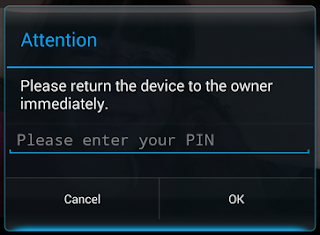
In case he/she hits the home button, a loud alarm will starting ringing notifying you that something is wrong. Awesome, isn't it?
2. Ninja Snap
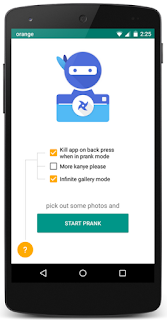
Ninja Snap is another photo saving app that takes the picture of the person who swipes right & left from the selected pics just the way Focus shows selected images. You have to select some photos and share them with Ninja Snap and give your phone to whom you want to show photos. As soon as that person swipes towards other pics, this app would take pictures of him/her and those would be saved in your phone's gallery. Thus you can easily identify the culprit.
Get iOS & Lollipop-like Status Bar in Any Android Version
Technology is getting advanced every new day. More and more new softwares and apps are being developed having better features than the former ones. Google's Android Lollipop and Apple's iOS are very famous for awesome UI design. One of many features is the changing of status bar color according to the app whose UI is opened.

Older (than Lollipop 5.0) Android versions do not support this feature but luckily, there's a method through which you can get this in older version as well (like I in my phone which runs Jellybean). You just need to follow these simple steps:-
- Your phone must be rooted.
- Firstly, you need to install Xposed Installer
(Note: Read the description then decide to install as it can damage your phone if you install the wrong version) - Allow SU Permission to Xposed Installer then open it and go to Download and then search for Tinted Status Bar.
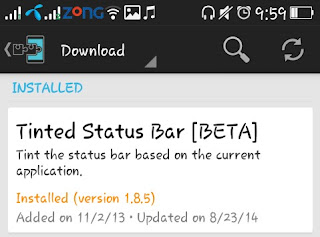
- After installing this module, go to Modules and check the Tinted Status Bar. Finally, soft boot your device by going to Framework in Xposed.
- Congrats, you've done it! The final result will be like this:

List of Top Educational Websites
It is rightly said, "Technology is a neutral tool between good and evil." If you've decided to use it for good, you're doing absolutely the right thing. Millions of people, especially students, refer to the internet to get any type of help. Most of the people fail to find a website which can provide information only according to their needs. Wikipedia has always been our heart favourite. I've sorted a short list of some educational websites which can serve as the treasure of words just as you want and would let you think out of the box.

Videos
The following list contains the websites that can help you getting educated with infinite amount of videos:-
- TED: Ideas worth spreading**
- Khan Academy*
- AcademicEarth.org
- edX
- The New Boston
- Or you can browse through millions of videos on YouTube
Life Hacks
This is the list of resources which will teach you to do some amazing stuff in your daily life:-
Mathematics
Maths lovers' paradise list comes here:-Cooking
Here comes the interesting part for cooking lovers (women perhaps). Let's see:-
Don't miss: Useful Tips for Studying Efficiently
Learning Languages
Learning foreign languages has always been my craze. Here are my picks for you:-
- Duolingo**
- Livemocha*
- Verbling
- busuu
- BBC Languages
- Memrise
- Oxford Dictionaries (Vocabulary)
Programming
Learn programming and create something really awesome whether a website or an app from here:-
- Codecademy*
- W3Schools*
- Code.org
- Learn Code The Hard Way
- Mozilla Developer Network**
- CodingBat
- LearnCode.academy**
Don't miss: Top JavaScript Libraries
Books
If you love to read books, you're not alone. Get your favourite books from here:-
Documentaries
Random Knowledge
If you are among the most of the people like to just wander through the internet to read whatever they come across just to improve their general knowledge, this is for you:- Wikipedia**
- Encyclopedia Britannica*
- mental_floss
- Sporcle - game
- F***ing Homepage
- snopes.com
- Everything Simplified
- The more you Know, the more you Grow (From our team)
DIY & How To's
Geeks' corner:-Courses
Some might like to attend a course to master a specific subject or a section of it. Following sites are for those:-
*: personal picks**: favorites ♥
How to: download videos from facebook without any software
Downloading media has always been a problem for those who like to have all the fun free. Some use Internet Download Manager but it creates some problems when you have to buy it after 30 days and some hacks don't go your way, either. Everyone likes to watch videos on Facebook and some download to watch later. World's top social network is on its way to become the second most popular network for sharing videos after YouTube.
In this tutorial, I'll show you how you can download Facebook videos without any software or third-party website simply by following these steps:
- Open facebook.com and login to your profile.
- Play the video of your choice by clicking on it.

- When the video is playing, go to the URL(address) of the video and replace www with m. For example, if my video address is "https://www.facebook.com/raja.hasnain.570/videos/vb.100004950877781/380632628778430/?type=3&theater" I'll have to make it "https://m.facebook.com/raja.hasnain.570/videos/vb.100004950877781/380632628778430/?type=3&theater".
- Hit Enter key and you'll be redirected to the mobile version of facebook.
- While the video is playing, right-click on the video and click on "Save video as...", select the location from popup and your video will start downloading.

Watch the Video Tutorial
This trick has been tested on Google Chrome and Mozilla Firefox. Keep sharing!
10 Richest Websites

Google.com is the largest search engine founded in 1998. Google provides many other services like Gmail, Blogger, YouTube and the most popular mobile OS, Android. Google is the richest website with total assets of $131 billion.
Amazon
Amazon is an American e-commerce website. The largest online store was founded by Jeff Bezos in 1994. Now, Amazon.com is serving almost all the countries in the world and has assets of about $54 billion.
Yahoo!
eBay
eBay is a multinational corporation allowing company to customer and customer to customer sales online. The fourth richest website was launched in 1995 and it is now the second largest auction center with assets of $44 billion.
Facebook
World's largest social media network Facebook was founded by 5 programmers in 2004. Every internet user is well aware of Facebook. The social network of 1.44 billion monthly active users has assets about $42 billion becoming fifth in the list.
Alibaba
Another e-commerce company website makes its way to the top websites being operated. Jack Ma's Alibaba is a Chinese business-to-business, business-to-customer & customer-to-customer sales center. After launch in 1999, Alibaba has assets of $41 billion.
Priceline
Another American Company making its way to the top 10 is Priceline. Woking on Name Your Own Price, it helps its users conduct travel-related purchases with discount. Total assets of Priceline are reported to be around $17 billion.
Expedia, Inc.
A part of Microsoft was founded in 1996 as Expedia. Expedia is a platform of travel brands serving 60 countries. $10 billion.
America Online, another American multinational company invests in brands, small businesses, and websites. Providing services to consumers, publishers and advertisers, AOL enjoys assets of a little below $3 billion.NetFlix
NetFlix provides its users internet media streaming in North America and many countries in Europe. Online DVD market, NetFlix, was first opened in 1997 and now has $9 billion assets.
AOL
Note: All the above data is based on personal estimates, errors possible.

 Trending


