Quote of the week

“ No steam or gas ever drives anything until it is confined.
No Niagara is ever turned into light and power until it is tunnelled.
No life ever grows until it is focused, dedicated, disciplined. ”
— Harry Emerson Fosdick ( Living Under Tension )

Everything Simplified

WhatsApp Messenger is now Available in Urdu & Bengali

1 comment

In : , ,

Image Source: Pixabay
Today I was checking for updates in Play Store and I came across an important update of WhatsApp Messenger.
WhatsApp is an instant messaging app through which one can send messages and calls over mobile data and Wi-Fi. It is available for Android, iOS, Windows and some other platforms. WhatsApp has over 1 billion users.
Today's latest update (2.12.252) is all about new features and improvements. Some of these improvements are summed up below:
The most important improvement WhatsApp Inc. has made is the support for Urdu and Bengali. As millions of WhatsApp users are from countries like Pakistan, India, Bangladesh etc., providing messaging services in users' native language will increase the usage it'll become much easier of them to use the app.
If you are planning to reset your phone and wipe off all your phone data, you need not to worry about your WhatsApp conversations because now you can backup your conversations on Google Drive
For safeguard against irritating people (I talked about them in my last post also) who like to message everytime, WhatsApp has made it possible to set special notification tone for a contact or you can even mute a chat so that you get important messages only, in busy hours. You can set different notification settings for different contacts.
As far as emoji lovers are concerned, they can now use the same emoji in different colors (this is was available in WhatsApp Web only). User has to long tap an emoji and colored options of that emoji will pop up.
Now, you don't have to use WhatsApp+ to hide from people you don't want to talk to because you can mark messages as read just like Facebook.
Other performance improvements include better contact card sending, lower data usage and bug fixes.
You can manually download the latest version here (Android). OR

Read More

Protect Your Private Photos in Android

Leave a Comment

In : , , , ,

Most of us love to keep images in phone as golden memories. This treasure can be spoiled by a naughty friend who would borrow your phone to see a pic and then start swiping left and right to see all of your photos. I got something that can be very useful to deal with such people.These two apps can do this job for you:-

1. Focus - Photo Sharing

Focus - Photo Sharing
This simple and light but useful gives you complete control over your photo viewers. You can limit the photos one can see on your phone when you lend your phone to your friend or someone else.
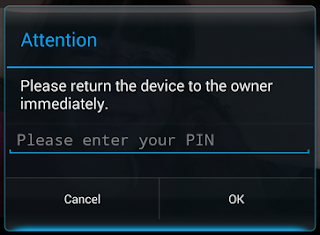
All you have to do is to set a pin code by opening Focus Settings, check all the alarms. To show someone a photo, you have to long tap the photo and tap share and select Focus from the list (multiple photos can also be selected). One can only see the pics you have selected. If your friend hits the back button, this will popup:-
Focus Popup
In case he/she hits the home button, a loud alarm will starting ringing notifying you that something is wrong. Awesome, isn't it?

2. Ninja Snap

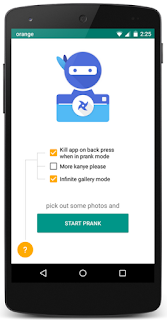
Ninja Snap
Ninja Snap is another photo saving app that takes the picture of the person who swipes right & left from the selected pics just the way Focus shows selected images. You have to select some photos and share them with Ninja Snap and give your phone to whom you want to show photos. As soon as that person swipes towards other pics, this app would take pictures of him/her and those would be saved in your phone's gallery. Thus you can easily identify the culprit.

Read More

Get iOS & Lollipop-like Status Bar in Any Android Version

1 comment

In : , , , ,

Technology is getting advanced every new day. More and more new softwares and apps are being developed having better features than the former ones. Google's Android Lollipop and Apple's iOS are very famous for awesome UI design. One of many features is the changing of status bar color according to the app whose UI is opened.

Status Bar
Older (than Lollipop 5.0) Android versions do not support this feature but luckily, there's a method through which you can get this in older version as well (like I in my phone which runs Jellybean). You just need to follow these simple steps:-
  1. Your phone must be rooted.
  2. Firstly, you need to install Xposed Installer
    (Note: Read the description then decide to install as it can damage your phone if you install the wrong version)
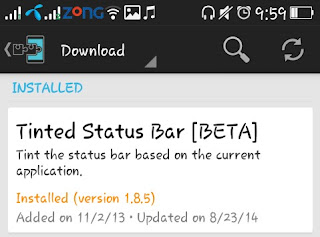
  3. Allow SU Permission to Xposed Installer then open it and go to Download and then search for Tinted Status Bar.
    Tinted Status Bar
  4. After installing this module, go to Modules and check the Tinted Status Bar. Finally, soft boot your device by going to Framework in Xposed.
  5. Congrats, you've done it! The final result will be like this:
You can select the apps for which you want this module to change color. Otherwise, you can simply turn this off in a particular app by tapping its Tinted Status Bar icon in your apps list.

Read More
↑